Hexadecimal Drum Loops
When you program a drum machine, you’re encoding a binary state (play or don’t play) for each drum (kick, snare, hi-hat, etc) at each time step. The obvious, intuitive interface – the one used by pretty much every sequencer and DAW – is a 2D grid of cells, with sounds on the Y-axis and time on the X-axis.

A drum loop displayed on a classic ‘piano roll’ MIDI interface.
What if you wanted to efficiently encode that drum loop using text? In hexadecimal, the characters 0-F represent base 16 values, with 4 bits per character. Let’s assign each bit to one of four drum sounds: kick, snare, closed hi-hat, and open hi-hat. Now character 8 (or 1000) becomes a kick drum, 2 (0010) becomes a closed hi-hat, A (1010) becomes kick and closed hi-hat, and so on.
Mapping out the whole hex alphabet, we get:
Hex character     0 1 2 3 4 5 6 7 8 9 A B C D E F
-------------------------------------------------
bit 0 (kick)    | 0 0 0 0 0 0 0 0 1 1 1 1 1 1 1 1
bit 1 (snare)   | 0 0 0 0 1 1 1 1 0 0 0 0 1 1 1 1
bit 2 (cl hh)   | 0 0 1 1 0 0 1 1 0 0 1 1 0 0 1 1
bit 3 (op hh)   | 0 1 0 1 0 1 0 1 0 1 0 1 0 1 0 1
Assigning each character to one 1/16th note, the drum loop above becomes 8020C022.
While you could imagine this being used as a serialization strategy to save drum loop state (as long as you’re satisfied with only four quantized tracks1), let’s go a step further and turn it into a user interface where you program drum loops using their hex encoding.
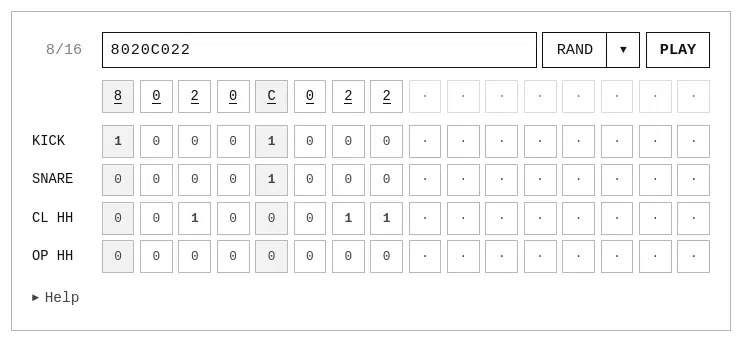
The result, which you can check out here, is a drum machine that’s deeply unintuitive, but (in my opinion) surprisingly fun2.