Invoking Existential Dread with Numpy
If you’ve lived in the US – especially an area prone to extreme weather – you’re probably uncomfortably familiar with this sound:
Aside from interrupting Bob’s Burgers with the threat of imminent death, the SAME header (as it’s known) marks the beginning of an emergency broadcast, encoding data about when, where, and why an alert is being issued. With the idea that we only fear what we don’t understand, let’s take a look at how the SAME header and the encoding system used to generate it – Frequency-Shift Keying – work, by building our own using Python and Numpy.
What is the SAME header?
The SAME header is a variable-length1 packet of ASCII data, a series of codes defined by a header format. Here’s an example header for a weekly test alert across five Florida counties, broadcast on October 5th by WTSP/TV:
ZCZC-EAS-RWT-012057-012081-012101-012103-012115+0030-2780415-WTSP/TV-
I won’t get into the details of how to parse the header, since it’s essentially just a lookup table. The interesting part is how that string gets converted to audio, which starts with first encoding it into binary.
Binary Encoding
Every SAME header begins with a “preamble” of 16 « characters that allow receivers to synchronize their clocks, so we’ll start by tacking that on to the message. Next, each character is converted to an ASCII byte, starting with the least significant bit. Finally, each bit gets repeated 92 times to create a baseband signal with the expected bit rate of 520 bits/s2. Writing that up in Python gives the following function:
def encode_header(header: str, bit_rate=520, sample_rate=48_000) -> np.ndarray:
    """Encode a SAME header into an array of bits."""
    msg = "««««««««««««««««" + header
    bits = []
    for char in msg:
        for bit in format(ord(char), "08b")[::-1]:
            bits.append(int(bit))

    return np.repeat(bits, sample_rate // bit_rate)

baseband = encode_header("ZCZC-EAS-RWT-012057-012081-012101-012103-012115+0030-2780415-WTSP/TV-")

The first 10k samples of the SAME header baseband signal.
Frequency-Shift Keying
If you’re broadcasting data over an analog wave, you’re going to need to do some signal modulation, shifting either the amplitude or the frequency of the carrier wave to encode the data. The Emergency Alert System uses audio frequency-shift keying, or AFSK, a specialization of frequency modulation for piggybacking binary data onto audio signals by shifting the carrier wave between a low frequency (known as the “space”) and high frequency (known as the “mark”) to represent 0 and 1.
Let’s take a quick detour away from the Emergency Alert System to see how FSK works in a simple case by implementing it in Numpy.
Plain FSK
The simplest form of FSK simply switches between two independent space and mark sine waves depending on the current data bit. In code, that looks something like this:
def generate_fsk(base: np.ndarray, low_freq: float, high_freq: float, sample_rate=48_000) -> np.ndarray:
    """Generate a plain FSK signal modulated by a baseband."""
    t = np.arange(base.shape[0]) / sample_rate
    space = np.sin(2 * np.pi * low_freq * t)
    mark = np.sin(2 * np.pi * high_freq * t)

    # Switch between the high and low frequency waves based on the data signal
    return np.where(base, mark, space)

generate_fsk(baseband, 220, 550)
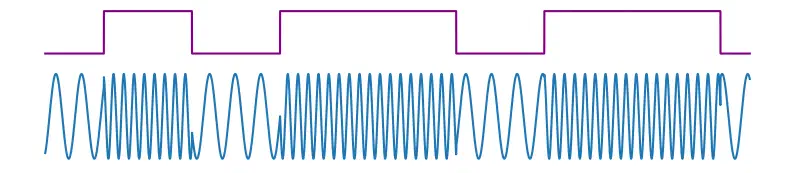
A carrier wave modulated by a baseband using plain FSK. Notice the discontinuities that occur when the two out-of-phase waves are switched.
This works, but if you look closely at the modulated wave you’ll notice abrupt discontinuities wherever the space and mark switch. This is caused by the two waves being out of phase, and has some important implications for hardware efficiency. In audio, with a low enough bit rate, this creates a noticeable “popping” noise at the frequency transitions:
Continuous-Phase FSK
To avoid amplitude discontinuity, there’s a modification of FSK called Continuous-Phase FSK. As the name suggests, CPFSK generates one wave that maintains consistent phase when switching frequency. In Numpy, we can achieve that by generating the sine wave from phase calculated over time:
def generate_cpfsk(base: np.ndarray, low_freq: float, high_freq: float, sample_rate=48_000) -> np.ndarray:
    """Generate a CPFSK signal modulated by a baseband."""
    # Instantaneous frequency at time t
    f_t = np.where(base, high_freq, low_freq)
    # Compute phase by integrating 2π * frequency over time
    phase = 2 * np.pi * np.cumsum(f_t) / sample_rate

    return np.sin(phase)

cpfsk = generate_cpfsk(baseband, 220, 550)
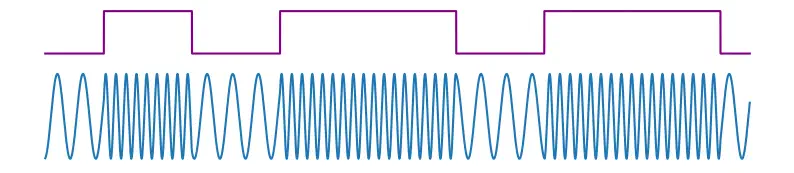
A carrier wave modulated by a baseband using Continuous-Phase FSK. By maintaining continuous phase, amplitude changes smoothly at the frequency transitions.
No more amplitude jumps, and no more pops!
Gaussian FSK
Another modification on top of CPFSK is Gaussian FSK. GFSK applies a Gaussian filter to smooth the transitions between on and off bits in the baseband signal prior to modulating the carrier wave. To simulate that in Numpy, we can calculate instantaneous frequency by linearly interpolating between the low and high frequency based on a filtered baseband.
from scipy.ndimage import gaussian_filter1d

def generate_gfsk(base: np.ndarray, low_freq: float, high_freq: float, sigma: float, sample_rate=48_000) -> np.ndarray:
    """Generate a GFSK signal modulated by a baseband."""
    filtered_base = gaussian_filter1d(base.astype(float), sigma)

    # Interpolate frequency between low and high based on the filtered data signal
    f_t = low_freq + filtered_base * (high_freq - low_freq)
    phase = 2 * np.pi * np.cumsum(f_t) / sample_rate

    return np.sin(phase)

gfsk = generate_gfsk(baseband, 220, 550, 150)
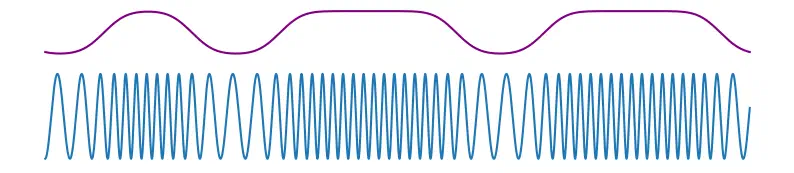
A carrier wave modulated by an (exaggerated) Gaussian-filtered baseband using GFSK. The smooth transitions between on and off bits create gradual frequency transitions in the modulated signal.
The Gaussian filter results in gradual frequency transitions in the modulated signal. This further reduces power consumption, making GFSK ideal for portable technology like Bluetooth, but at the cost of increased interference between neighboring bits.
Building the Header
Now that we know how FSK and its variations work, let’s return to the Emergency Alert System. The SAME header is encoded using CPFSK in the audio spectrum, with a mark frequency of 2083.33 Hz and a space frequency of 1562.5 Hz. For redundancy, the SAME header is repeated three times with one second of silence between, giving receivers a few chances to get the complete message.
Using the functions defined above, we can encode the header message and apply CPFSK to create the modulated carrier wave. To get the full experience, let’s also include the two-tone attention signal of dissonant sine waves that follows the header:
sample_rate = 48_000
header = "ZCZC-EAS-RWT-012057-012081-012101-012103-012115+0030-2780415-WTSP/TV-"
baseband = encode_header(header)

# Generate the CPFSK encoding of the header followed by 1s of silence
modulated_header = np.concatenate([
    generate_cpfsk(baseband, 1562.5, 2083.33),
    np.zeros(sample_rate),
])

# Repeat the SAME header three times, followed by the attention tone
t = np.arange(sample_rate * 3) / sample_rate
signal = np.concatenate([
    np.tile(modulated_header, 3),
    0.5 * (np.sin(2 * np.pi * 853 * t) + np.sin(2 * np.pi * 960 * t)),
])
Decoding the Header
Encoding data into audio isn’t much use if you can’t get the data back out. To extract the message from the encoded SAME header, we can use a matched-filter demodulator. The technique relies on two band-pass filters, which cut frequencies above and below a target frequency, applied at the space and mark frequencies. By comparing which filtered signal has a higher absolute amplitude over each bit period, we should be able to identify the encoded bit.
from scipy.signal import butter, filtfilt
from scipy import stats

def bandpass_filter(
        signal: np.ndarray,
        freq: float,
        width: float,
        sample_rate=48_000
    ) -> np.ndarray:
    """Apply a symmetrical bandpass filter to the signal."""
    nyquist = 0.5 * sample_rate
    low = (freq - width / 2) / nyquist
    high = (freq + width / 2) / nyquist
    b, a = butter(2, [low, high], btype='band')
    return filtfilt(b, a, signal)


def matched_filter_demodulator(
        modulated: np.ndarray,
        low_freq: float,
        high_freq: float,
        filter_width: int,
        bit_rate: int,
        sample_rate: int=48_000
    ) -> np.ndarray:
    """Demodulate an FSK signal using a pair of matched bandpass filters."""
    space_filtered = bandpass_filter(modulated, low_freq, filter_width, sample_rate)
    mark_filtered = bandpass_filter(modulated, high_freq, filter_width, sample_rate)

    # Set a 0 or 1 depending on which frequency is louder at each sample
    decoded = (abs(space_filtered) > abs(mark_filtered)).astype(int)
    # Identify the majority bit across each bit period
    return np.array(stats.mode(decoded.reshape(-1, sample_rate // bit_rate), axis=1)[0]).reshape(-1)
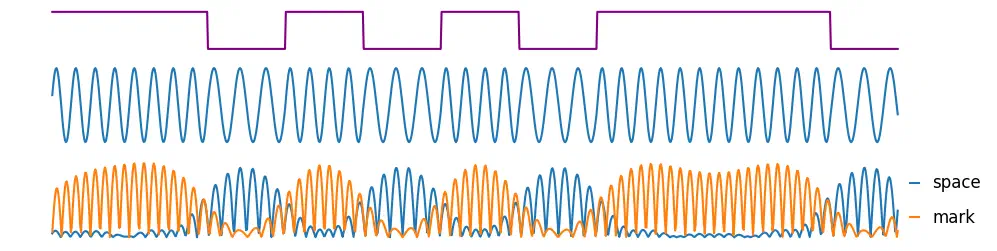
The baseband, modulated signal, and absolute values of the filtered space and mark frequencies.
Once the bits are extracted, they can be decoded back into a string message, paying attention to the reversed bit order in which they were encoded and the 16-character preamble that was added on:
def decode_header(bits: np.ndarray) -> str:
    """Decode a SAME header from a list of bits."""
    chars = []
    for byte in bits.reshape(-1, 8):
        char = chr(int("".join(map(str, byte))[::-1], 2))
        chars.append(char)

    return "".join(chars)[16:]
Putting that all together, let’s apply a matched-filter demodulator to a copy of the SAME header with some heavy noise added in for realism:
Volume warning!
Demodulating and decoding the bits returns…
demodulated_bits = matched_filter_demodulator(
    modulated_header,
    low_freq=1562.5,
    high_freq=2083.33,
    filter_width=300,
    bit_rate=520,
)

decode_header(demodulated_bits)
ZCZC-EAS-RWT-012057-012081-012101-012103-012115+0030-2780415-WTSP/TV-
…the original header, perfectly reconstructed!